> For the complete documentation index, see [llms.txt](https://docs.oort.io/llms.txt). Markdown versions of documentation pages are available by appending `.md` to page URLs; this page is available as [Markdown](https://docs.oort.io/release-notes/2022/week-32-2022.md).
# Week 32, 2022
**News:**

Oort is now fully-integrated with Workday! Human resources information systems (HRIS) are the source of truth for organizations of all sizes, and Workday is a leading platform for growth-stage and enterprise companies.
Oort’s integration utilizes Workday’s Report-as-a-Service (RaaS) to bring daily, up-to-date employee records into Oort From there, we do our thing, generating Workday analytics to create two HR-specific identity security checks:
**✅HRIS Discrepancies**
*A user’s manager should be consistent across IDP and HR systems. When these are out of sync, investigation, escalation, and remediation of risks becomes more cumbersome and less efficient.*
**✅User in IDP but not HRIS**
*When a user is present in an identity provider, but not in the HR system, it can indicate that the user has access to applications but has not been employed by the organization, or the user was not properly deprovisioned from previous employment. These accounts should be investigated.*
Naturally, Oort can bring these non-compliant users to the attention of their managers or open tickets directly with specialists who can investigate and remediate the risks.
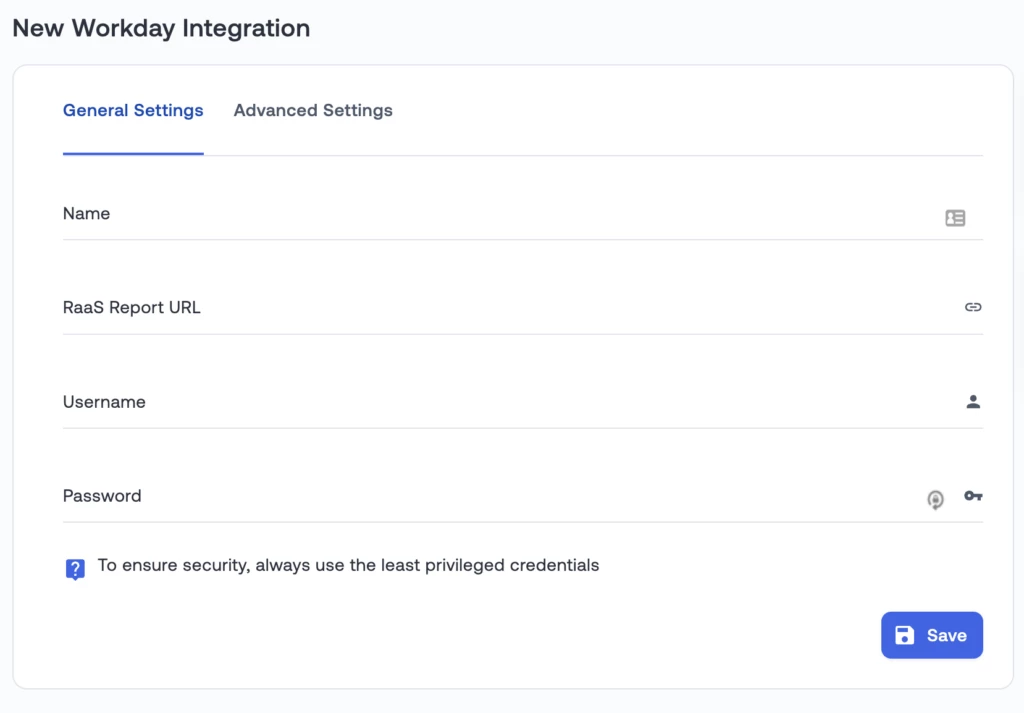
To get started yourself, just go to the Integrations tab in Oort, click “Add Integration”, then navigate to and click the Workday tile. Name the integration, give it your Reports URL, and the Workday username and password with permissions to access the report. Note that HRIS file upload is still supported for Workday and other HRIS systems.
If you are using Workday, you’ll definitely want to jump on this functionality right away as it will eliminate the need for any HRIS file upload. Contact our customer support team if you have any questions about how to set up the RaaS in Workday or if you need help getting started.
\
[Contact Support](https://oort.io/cs/c/?cta_guid=360224aa-ecf2-4c04-b07c-a28966f369f6\&signature=AAH58kGkBvMVSFNoiHceUVlp8wBC8vS1-w\&pageId=84321665960\&placement_guid=7ec2e251-5636-4d18-820b-f6d319e3387a\&click=14d84b4d-f2ce-45bb-af0d-597f23f00e4b\&hsutk=4e4f37c192e5b77f612567d11bcea7be\&canon=https%3A%2F%2Foort.io%2Fblog%2Frelease-notes-week-32-2022\&utm_referrer=https%3A%2F%2Foort.io%2Fblog%2Fpage%2F4\&portal_id=21336242\&redirect_url=APefjpH2pmTj4GNwtVqokfTM7z9Q_hG1lGBP1R6oYwoe01qHHY-750r3gHJfPCKlYjbU1li4naXe8pP4Bw8kPxiOP8Z1qVy7C1A5I7S-9-cg21Kwn_zZphyTAQJkvjYZmQVhttvEEcxkRVr42_M8oYVbDjsBc8zeG94ctUSQf6b5L41RCwABK67NFJP56WM4BzPLW8O9Q421SEcyIY4Zv_RmT_279t7tPCIGVF9_IUW0wV6gospBzhKQeVlL2SUTJxc3L6B-lIzp&__hstc=104981084.4e4f37c192e5b77f612567d11bcea7be.1670340920292.1675799943287.1675811354883.76&__hssc=104981084.42.1675811354883&__hsfp=2805712923\&contentType=blog-post)
**New Features**
**📊Median Group Membership Charts**
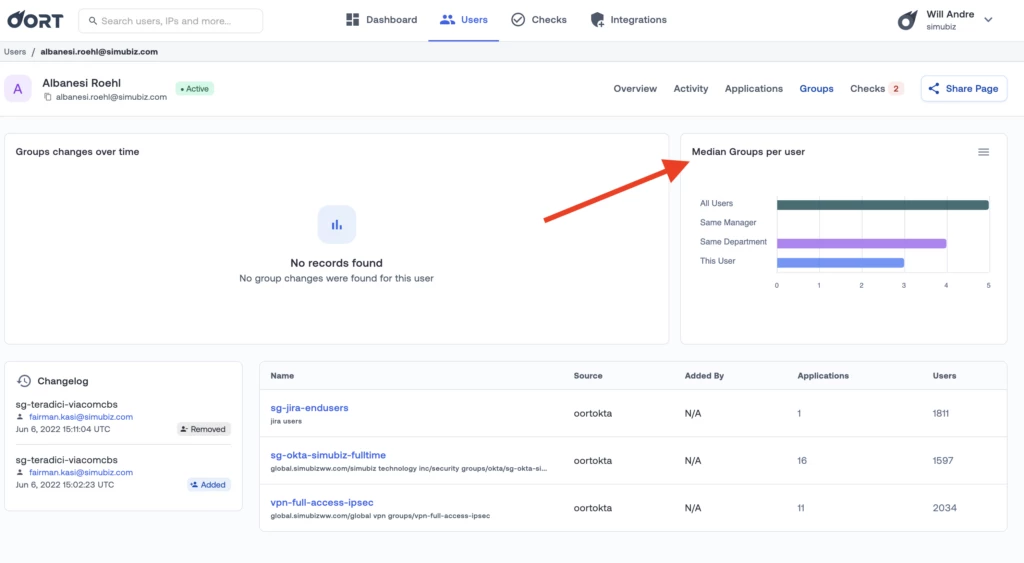
You can now see how a user’s group memberships compare to their peers. Navigate to any ussr and click on the ‘Groups’ tab to see their comparison. Users with a large number of memberships relative to their peers likely have greater access to resources and their identities can appear riskier or more “valuable” to an adversary by comparison.
That’s a wrap for this week! Make sure you subscribe to our updates up top so you don’t miss any new features or announcements coming from Oort! Can’t wait? Get a demo today!