> For the complete documentation index, see [llms.txt](https://docs.oort.io/llms.txt). Markdown versions of documentation pages are available by appending `.md` to page URLs; this page is available as [Markdown](https://docs.oort.io/dashboard/posture/non-human-identities-dashboard.md).
# Non-Human Identities Dashboard
2025.10.08
## Overview
This dashboard gives you a comprehensive view of your Non-Human Identities (NHIs), focusing on important areas like security, compliance, and operational efficiency. By checking these metrics regularly, you can quickly spot and fix potential risks, keep everything running smoothly, and make sure your NHIs are well managed.
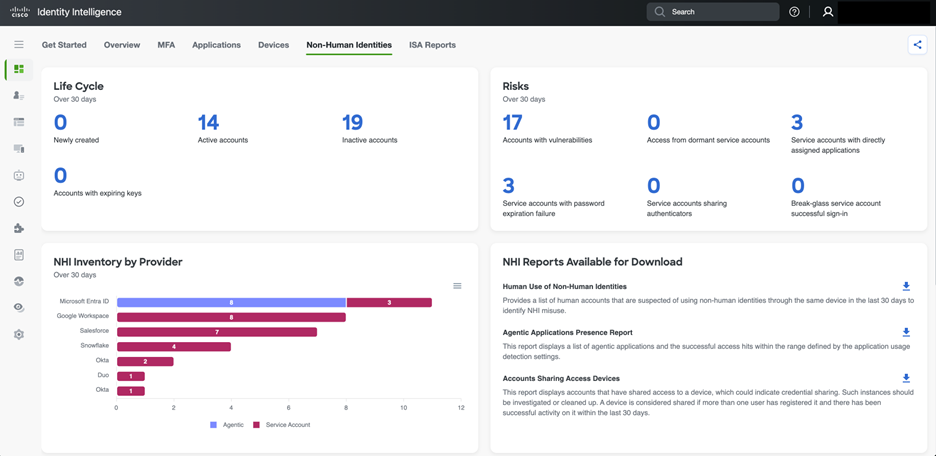
To use the Non-Human Identities dashboard, simply open the Cisco Identity Intelligence dashboard and select the **Non-Human Identities** tab. Here, you will find easy-to-understand information about your NHIs, including their status, risks, usage, and activity, so you can keep your organization secure and organized.
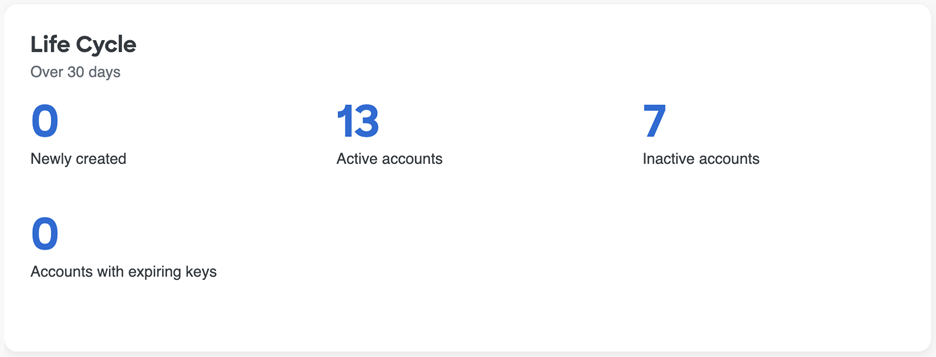
### Life Cycle (Past 30 days)
This section tracks the status of NHI accounts over the last 30 days.
* Newly created: This count shows how many new NHI accounts have been provisioned in the past month. In the example provided, zero NHIs were created in the last month. While this may indicate stability in the existing NHI infrastructure or a temporary pause in onboarding, an unexpected zero could also signal a potential process issue if new NHIs were anticipated.
* Active accounts: These are NHI accounts that have recorded activity within the past 30 days. Monitoring active accounts helps ensure they are functioning as intended and that their activity is legitimate. A large number of active NHIs may require increased management and oversight.
* Inactive accounts: These NHI accounts have not shown any activity in the past 30 days. Inactive NHIs can present a security risk if they still have access permissions, as they may be exploited without prompt detection. Regularly reviewing and deprovisioning inactive NHIs is essential to minimize potential security vulnerabilities.
* Accounts with expiring keys: This count represents the number of NHI accounts with keys that are nearing expiration. If these keys are not rotated in advance, it may result in service disruptions. Regular key rotation is considered the best practice for maintaining NHI security.
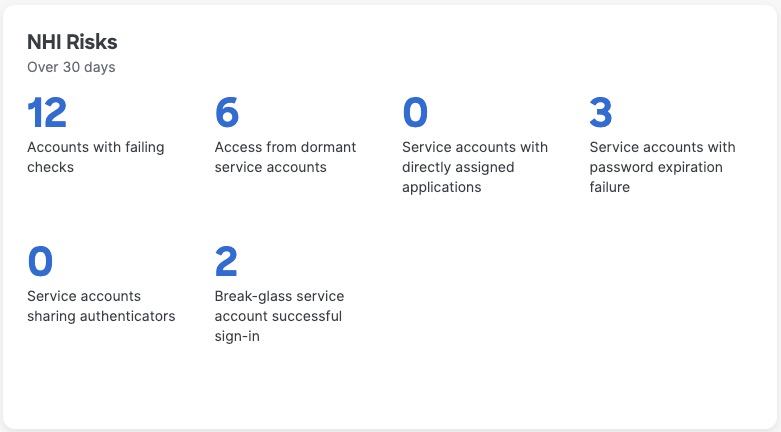
### NHI Risks (Over 30 days)
This section highlights potential security vulnerabilities and risky behaviors associated with NHIs. Selecting any of the numbers within this widget will take you to the relevant page, pre-filtered on the selection you made.
* Accounts with vulnerabilities: This is a critical metric, as NHI accounts with vulnerabilities can serve as potential entry points for attackers. Such vulnerabilities may include misconfigurations, unpatched software, or weak credentials. Prompt investigation and remediation are essential to prevent security breaches.
* Access from dormant service accounts: This indicates that dormant service accounts have accessed resources, which is a high-risk situation. Dormant accounts are often overlooked but may still have extensive permissions. Any activity from these accounts should be validated to determine whether it is legitimate or a sign of potential compromise.
* Service accounts with password expiration failure: This indicates that service accounts have failed because their passwords expired. If not resolved, this can cause service outages and may highlight weaknesses in password management policies or automated rotation processes for these NHIs.
* Service accounts with directly assigned applications: Directly assigning applications to service accounts can result in NHIs with excessive privileges and complicated permission management. It is best practice for NHIs to receive access through roles or groups, following the principle of least privilege.
* Service accounts sharing authenticators: Sharing authenticators, such as API keys or certificates, between multiple NHIs or with human users creates a single point of failure and makes activity attribution challenging. This significantly increases security risks and should be avoided.
* Break-glass service account successful sign-in: A successful sign-in by a break-glass service account means that a highly privileged account has been used. While this may be necessary in certain situations, each use should be carefully audited and justified to ensure it was authorized and not a misuse or unauthorized attempt.
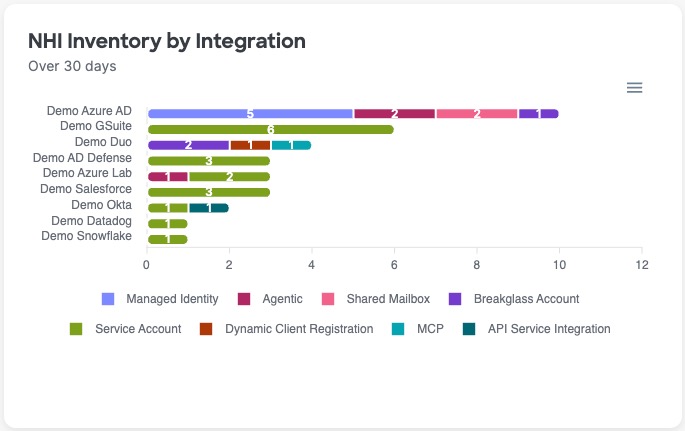
### NHI Inventory by Integration (Over 30 days)
This chart displays the distribution of different NHI types across various cloud and identity providers, offering a clear view of where NHIs are located and their functional roles. This inventory helps organizations understand their overall NHI footprint, spot potential shadow IT, and ensure consistent security policies are enforced across all platforms. It also highlights the prevalence of specific NHI types, such as "Agentic," which refers to applications that act on behalf of users or other systems.
## Posture Score
Cisco Identity Intelligence separates posture into three scores. Each score ranges from 0 to 100. Higher scores indicate stronger posture. The NHI Dashboard highlights the NHI Score, specifically.
See [Identity Posture Scores](/identity-posture-score.md) for more info on the other category scores, score calculation details, and remediation guidance.
### Posture score recommendations
The Posture Score widget provides the current score for the given posture area. It also shows:
* the score threshold level
* the score change over the last 30 days (+ to indicate an increase and - to indicate a decrease)
* the last date the score was calculated
* prioritized recommendations, including
* the number of entities failing the check associated with the recommendation
* the severity of the issue that is being recommended for remediation
Recommendations are ordered by expected impact on the relevant score. Fully remediating the first recommendation produces the greatest improvement to the given category's score. Although other recommendations may have more entities failing, fully resolving "Priority 1" will lead to a bigger improvement in the score than fully resolving "Priority 4", for example.
Select the number of entities in the 'Failing Entities' counter to go to the Checks page or the relevant inventory page, pre-filtered for the entities failing the selected check, so that you can take action to improve your posture score.
You may see **View Check** when a contributing check is disabled or fails on settings, rather than entities. Select the **View Check** to review the results or enable the check as needed.
### Posture score trend
The trend widget shows changes to the given posture score over time to depict changes to the category-level posture score over time so that you can see and report on your progress, as well as better understand how different events may have impacted the given Posture Score positively or negatively over time.
Hover over a data point, which are marked by a dot on the trend line, to see explainability about why the score may have increased or decreased. The 3 attributes that contributed most to the score change will be displayed when you hover on a specific data point.
By default, this widget looks at the last 30 days; however, you can use the timeframe filter in the top right-hand corner of the widget to change the widget's timeframe to be longer or shorter depending on your needs.
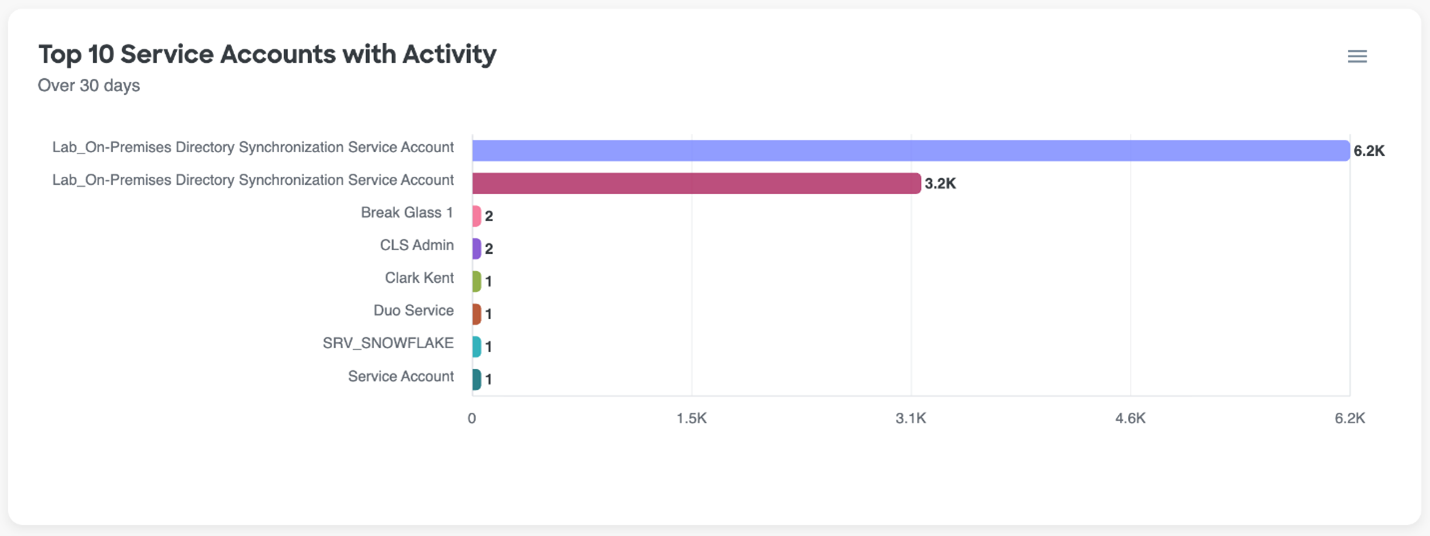
### Top 10 Service Accounts with Activity (Over 30 days)
This chart highlights the NHI accounts with the highest activity over the past 30 days. High activity levels often indicate that these NHIs play a critical role in operations. Regularly monitoring these accounts for unusual spikes or changes in activity is important for identifying potential compromises or misconfigurations. Even low activity on critical accounts should be reviewed to confirm all usage is legitimate.
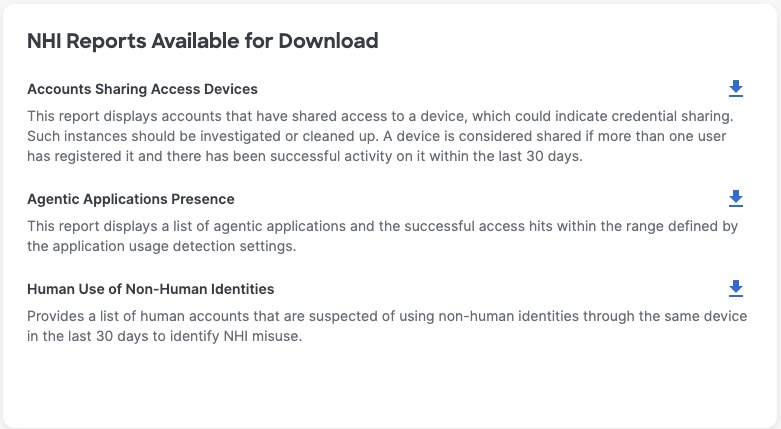
### Reports
The NHI dashboard includes a new feature that allows you to download reports directly from the dashboard, offering important insights for effective NHI management. Key reports include Human Use of Non-Human Identities, which uncovers security risks when people use NHI credentials, the Agentic Applications Presence Report, which monitors autonomous application activity for compliance with security policies, and Accounts Sharing Access Devices, which identifies potential credential sharing and access control concerns that need prompt attention.